Firecracker microVMs with SwarmKit orchestration
Docker Swarm UX with hardware-isolated VMs.
v0.13.0 hugepages · NUMA placement · cgroup v2 · alerting Release notes
curl -fsSL https://swarmcracker.com/install.sh | sudo bashweb, each a sealed
Firecracker microVM on its own KVM boundary — placed and tracked by SwarmKit.
How it works
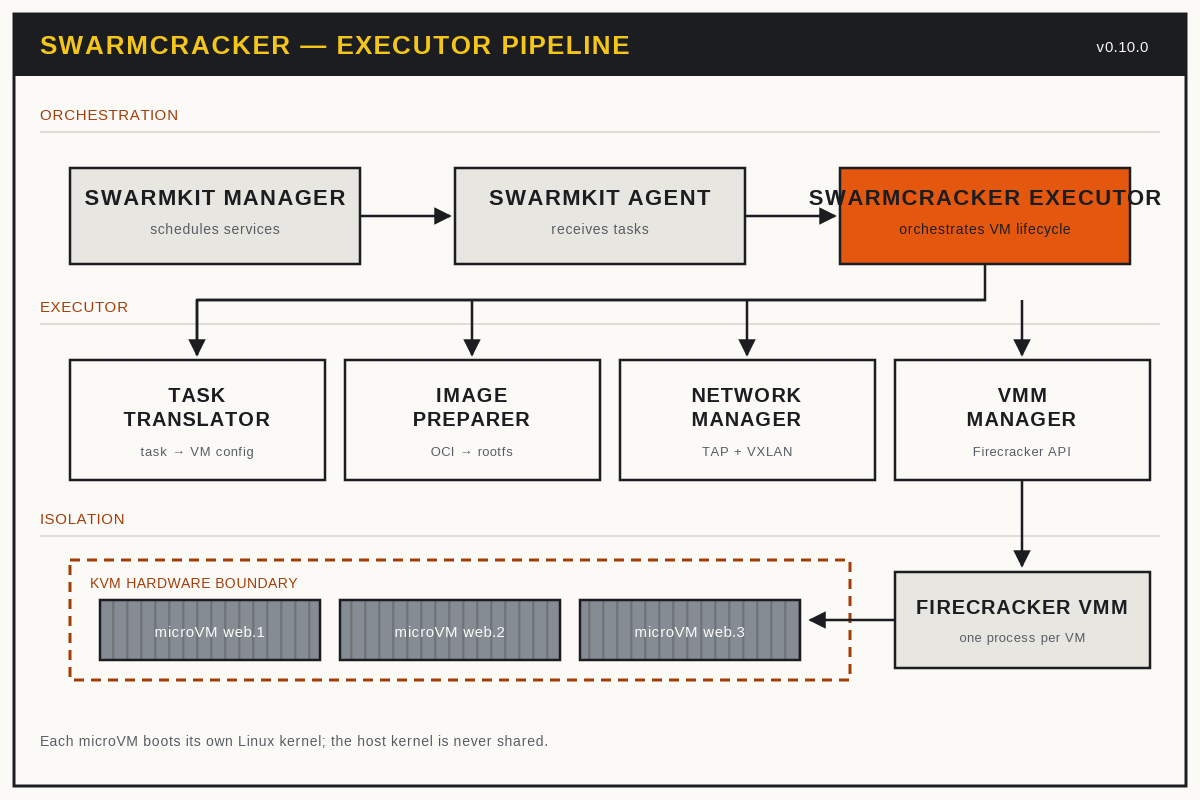
SwarmCracker slots a Firecracker microVM executor underneath SwarmKit. Tasks arrive as ordinary Swarm services; each replica is placed as its own sealed VM.
-
Install SwarmCracker
Run the one-line installer to download the binary, kernel image, and rootfs in a single step.
-
Verify prerequisites
Check that KVM is available, the host meets resource requirements, and required tools are installed.
-
Set up networking
Create the bridge and TAP device configuration that SwarmCracker uses to connect microVMs.
-
Deploy a service
Use the familiar docker service create syntax to launch your first container inside a Firecracker microVM.
$ swarmcracker service create --name web --image nginx:alpine --replicas 3creating service "web" (3 replicas)...pulling image nginx:alpine ...extracting rootfs ...creating microVM for task web.1 ...booting kernel ...microVM web.1 started (1024 MiB, 2 vCPUs)creating microVM for task web.2 ...microVM web.2 started (1024 MiB, 2 vCPUs)creating microVM for task web.3 ...microVM web.3 started (1024 MiB, 2 vCPUs)service "web" converged (3/3 replicas)Illustrative output — a sample service, not a live host.
Why SwarmCracker?
Nine capabilities the executor brings to every task it places — drawn from the same spec sheet the microVMs are built to.
SPEC 01 · KRNL
Per-VM kernel
Each microVM boots its own Linux kernel, so workloads are fully isolated at the hardware level rather than sharing a host kernel.
SPEC 02 · SWRM
SwarmKit compatible
Drop-in executor for SwarmKit. Use standard docker service commands to create, scale, and update services backed by Firecracker VMs.
SPEC 03 · KVM
KVM hardware isolation
Leverages KVM to provide hardware-enforced boundaries between workloads — stronger than namespace-based container isolation.
SPEC 04 · BOOT
~100 ms boot
Firecracker microVMs start in roughly 100 milliseconds, keeping service scaling responsive even under burst traffic.
SPEC 05 · NET
VXLAN cross-node networking
Built-in VXLAN overlay lets containers on different hosts communicate securely without external CNI plugins.
SPEC 06 · ROLL
Rolling updates
Standard SwarmKit rolling-update strategies work out of the box — update images, change resource limits, or roll back with familiar flags.
SPEC 07 · QOS
Resource QoS
cgroup v2 CPU, memory and I/O limits, --cpuset pinning, 2M hugepages and --numa-node memory placement — enforced per VM, with a clear failure when the host cannot honour a hard request.
SPEC 08 · OBSV
Observability & alerts
Prometheus metrics for VM health, crashes and disk usage, plus shipped alert rules and an Alertmanager sink — wired by default instead of left inert.
SPEC 09 · REGY
Private registries
service create --with-registry-auth forwards the manager’s registry credentials to workers, so private images pull without a second config on every node.
Quickstart
Seven loading orders take a bare Linux host to a running service. Copy each one in order — the whole run is a single bill of lading.
Load order host → yard
curl -fsSL https://swarmcracker.com/install.sh | sudo bashsudo swarmcracker setup checksudo swarmcracker setup install --download-kernel --download-rootfssudo swarmcracker setup networksudo swarmcracker setup config --non-interactivesudo swarmcracker cluster init --advertise-addr 192.168.1.10:4242swarmcracker service create --name web --image nginx:alpine --replicas 3How it compares
Same Swarm-style workflow you already know, with a hardware boundary around every workload. Here is where that lands against Docker and Kubernetes.
| Aspect | SwarmCracker | Docker | Kubernetes |
|---|---|---|---|
| Isolation | KVM hardware virtualization per workload | Shared kernel via namespaces and cgroups | Shared kernel via namespaces and cgroups |
| Boot time | ~100 ms (Firecracker microVM) | ~50 ms (container start) | ~50 ms (container start) |
| Orchestration | SwarmKit (built-in) | Docker Swarm / Compose | Custom scheduler and control plane |
| Learning curve | Familiar Docker Swarm commands | Familiar Docker commands | Steeper — YAML manifests, many abstractions |
| Networking | Built-in VXLAN overlay | Overlay / bridge networks | Requires CNI plugin selection |
| Resource controls | cgroup v2 quotas, CPU pinning, hugepages, NUMA placement | CPU/memory limits on a shared kernel | Requests and limits; hugepages via a plugin, no VM pinning |
Security
The boundary is the point. Every workload is sealed behind a KVM hardware edge, not a namespace in a shared kernel.
Hardware-enforced boundaries
Each workload runs inside its own KVM virtual machine, so a kernel exploit in one VM cannot affect the host or neighbouring VMs.
-
Minimal attack surface
Firecracker is purpose-built for serverless and microVM workloads — a small codebase with a reduced threat model compared to general-purpose hypervisors.
-
Jailer support
SwarmCracker integrates Firecracker's jailer to further restrict each VMM process with cgroups, seccomp filters, and chroot jails.
-
Apache 2.0 licensed
Fully open source under a permissive license. Audit the code, contribute fixes, and run it anywhere without vendor lock-in.
Documentation
Four gates into the manual — start at A if this is your first host.
Getting Started
Install SwarmCracker, verify prerequisites, and deploy your first microVM-backed service.
CLI Reference
Complete reference for every swarmcracker command, flag, and subcommand.
Programmatic API
A stable HTTP/JSON API v1 with bearer tokens, streaming exec and logs, interactive attach, files, and experimental snapshots — plus dependency-free Python and Node SDKs.
Networking
Configure bridges, TAP devices, VXLAN overlays, and cross-node networking.
Security
Understand the isolation model, jailer configuration, and security best practices.
Resource QoS
Memory balloon, CPU pinning, cgroup limits, hugepages, and NUMA placement.
Alerting
Crash-loop and health signals, the shipped rules, and the Alertmanager sink.